
SecuX Firmware Update1.0.5 - App Store
You'll be able to see results in few seconds.
Publisher Description

SecuX Firmware Update App
Fast, Safe and Easy Update
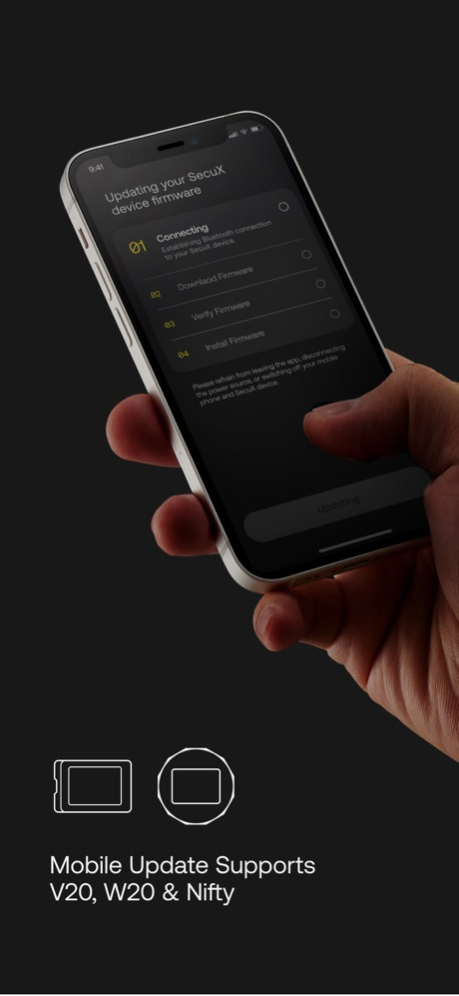
SecuX Firmware Update App provides a fast, safe and easy firmware update process via Bluetooth connection for SecuX V20, W20 and Nifty hardware wallets. The interactive step-by-step guide prepares users to follow instructions, and complete firmware update in just a few minutes.
Why Do I Need to Update Firmware?
At SecuX, we are continuously updating and improving our products and services, so that users worldwide can utilize it to their full capacities. Your SecuX device will be required to update its firmware from time to time, as we add support for new coins, tokens or other features.
Before You Start
Please make sure you have all of the following items:
- Recovery Words & Passphrase
- A Safe and Stable Internet Connection
- iOS device and Wallet sufficiently charged and a charger.
Enter Update Mode, Secure Connection, Download, Verification and Installation
Once your SecuX device is in update mode, you can begin the firmware update process. The SecuX Firmware Update App will automatically start to establish Bluetooth connection, download firmware, verify firmware version and install firmware on your SecuX device.
Compatibility
SecuX Firmware Update App is fully compatible with SecuX V20, W20 and Nifty hardware wallets via Bluetooth connection.
After updating the firmware successfully on your SecuX device, you can connect your SecuX wallet to SecuX App or SecuXess web application, and manage your crypto assets safely and securely. For more information on SecuX products and services, please visit: https://secuxtech.com
Version History Support New SecuX Device
1. Nifty-X
2. Bio Shield 1.0.5 08/29/2023 Optimize connection stability with SecuX wallet. 1.0.4 07/04/2022 Add firmware update support for a new model - SecuX Nifty 1.0.3 05/23/2022 1. Automated update of text content from the server.
2. Programmed download of latest firmware version. 1.0.2 11/08/2021 1.0.1 09/26/2021
About SecuX Firmware Update
The company that develops SecuX Firmware Update is SecuX Technology Inc.. The latest version released by its developer is 1.0.5.
To install SecuX Firmware Update on your iOS device, just click the green Continue To App button above to start the installation process. The app is listed on our website since 2026-10-14 and was downloaded 0 times. We have already checked if the download link is safe, however for your own protection we recommend that you scan the downloaded app with your antivirus. Your antivirus may detect the SecuX Firmware Update as malware if the download link is broken.
How to install SecuX Firmware Update on your iOS device:
- Click on the Continue To App button on our website. This will redirect you to the App Store.
- Once the SecuX Firmware Update is shown in the iTunes listing of your iOS device, you can start its download and installation. Tap on the GET button to the right of the app to start downloading it.
- If you are not logged-in the iOS appstore app, you'll be prompted for your your Apple ID and/or password.
- After SecuX Firmware Update is downloaded, you'll see an INSTALL button to the right. Tap on it to start the actual installation of the iOS app.
- Once installation is finished you can tap on the OPEN button to start it. Its icon will also be added to your device home screen.
Program Details
System requirements
Download information
Pricing
Version History
version 1.0.5
posted on 2026-10-14
Version History Support New SecuX Device
1. Nifty-X
2. Bio Shield 1.0.5 08/29/2023 Optimize connection stability with SecuX wallet. 1.0.4 07/04/2022 Add firmware update support for a new model - SecuX Nifty 1.0.3 05/23/2022 1. Automated update of text content from the server.
2. Programmed download of latest firmware version. 1.0.2 11/08/2021 1.0.1 09/26/2021
version 1.0.5
posted on 2023-08-29
Support New SecuX Device
1. Nifty-X
2. Bio Shield
version 1.0.5
posted on 2023-08-29
Aug 29, 2023
Version 1.0.5
Support New SecuX Device
1. Nifty-X
2. Bio Shield
Disclaimer
Official App Store Link
We do not host SecuX Firmware Update on our servers. We did not scan it for viruses, adware, spyware or other type of malware. This app is hosted by Apple and passed their terms and conditions to be listed there. We recommend caution when installing it.
The App Store link for SecuX Firmware Update is provided to you by apps112.com without any warranties, representations or guarantees of any kind, so access it at your own risk.
If you have questions regarding this particular app contact the publisher directly. For questions about the functionalities of apps112.com contact us.
